
If you want to troubleshoot DSC (Desired State Configuration)… You can easily run a DSC config script locally on your computer, apply the MOF manually on-demand and watch it apply in realtime as per the below. The below are the lines of PowerShell code you need for testing. First though, make sure you run the entire DSC Configuration block of code – so it’s in memory, similar to how a function behaves. In the example below, my DSC configuration file is called ‘Main‘. This file contains hidden or bidirectional Unicode text that may be interpreted or compiled differently than what…
Category: PowerShell
Log Analytics Data Collector API
Grab data/information from anywhere and store this in Log Analytics. Basically any log, any OS, any type of data can be captured on a loop and sent to a Log Analytics workspace on a constant basis, then can be used to pull out reports etc. My example below pulls the ‘Current Playing Song‘ out of radio station websites, it runs through many radio stations, at the end converts the aggravated results to JSON, then the data is sent to the Custom Log in Log Analytics using the API. You can run the script below on a regular basis, e.g. set…
Change Azure Storage Blob Tiers
Imagine you had a whole lot of data stored in Azure, you also want to save the most money in storage costs. By default, Azure Blob Storate is set to the Hot tier for all blobs, the most expensive storage costs, but the cheapest to read. To give you an idea of the cost savings, here are General Purpose v2 storage account pricing below as of time of publication in US dollars: HOT COOL ARCHIVE Storage | First 50 terabyte (TB) / month $0.0208 per GB $0.0152 per GB $0.0025 per GB Storage | Next 450 TB / Month $0.02 per GB $0.0152 per…
Move VMs from & to anywhere in Azure
Automatically move VMs from anywhere & to anywhere in Azure: Move VMs across subscriptions Move VMs across tenants In the same region or across regions No downtime on the source VM (if there’s no data disks), the source VM remains in-tact Copies both the OS disk and any data disks attached to the VM Both Standard & Premium managed disks supported Works with ARM Managed Disk based VMs only. This script is fully automatic and cleans up temp disks & storage accounts at the very end. It shows the copy process and doesn’t waste time by coping white space on…
Scheduled Task with a Logon Delay
Creating a Scheduled Task to run at logon with a delay is somewhat cumbersome with PowerShell, so as a result, you need to call the Task Scheduler Scripting Objects. Below walks you through it. This file contains hidden or bidirectional Unicode text that may be interpreted or compiled differently than what appears below. To review, open the file in an editor that reveals hidden Unicode characters. Learn more about bidirectional Unicode characters Show hidden characters $adminname = 'MyUser' $adminpassword = 'password' $taskName = "Start Studio" $ShedService = New-Object -comobject 'Schedule.Service' $ShedService.Connect() $Task = $ShedService.NewTask(0) $Task.RegistrationInfo.Description = $taskName $Task.Settings.Enabled = $true $Task.Settings.AllowDemandStart…
Change Azure ARM VM OS disk
Sometimes you would want to create an Azure ARM based Virtual Machine using an existing VHD disk. It used to be much easier in ASM (Classic). However you can easily swap out the OS disk for a VM using PowerShell. This post focuses on swapping un-managed disks, however you can swap out managed disks now, since April 2018. Simply create a new (non-managed disk) based VM in Azure with new disks. Then you use PowerShell to swap out the OS disk with an existing disk. Good news is that the OS disk doesn’t have to be sysprepped, simply swap the…
Add additional NIC to Azure ARM VM
Sometimes you would want to add an additional Network Interface Card to a Microsoft Azure ARM (Azure Resource Manager) based virtual machine. PowerShell is your answer: This file contains hidden or bidirectional Unicode text that may be interpreted or compiled differently than what appears below. To review, open the file in an editor that reveals hidden Unicode characters. Learn more about bidirectional Unicode characters Show hidden characters # Recently tested fully with a later version of the Azure PowerShell module – Install-Module AzureRM -RequiredVersion 4.4.1 #region Logon to Azure Login-AzureRmAccount $subscription = Get-AzureRmSubscription | Out-GridView -PassThru Select-AzureRmSubscription -SubscriptionId $subscription.Id #endregion…
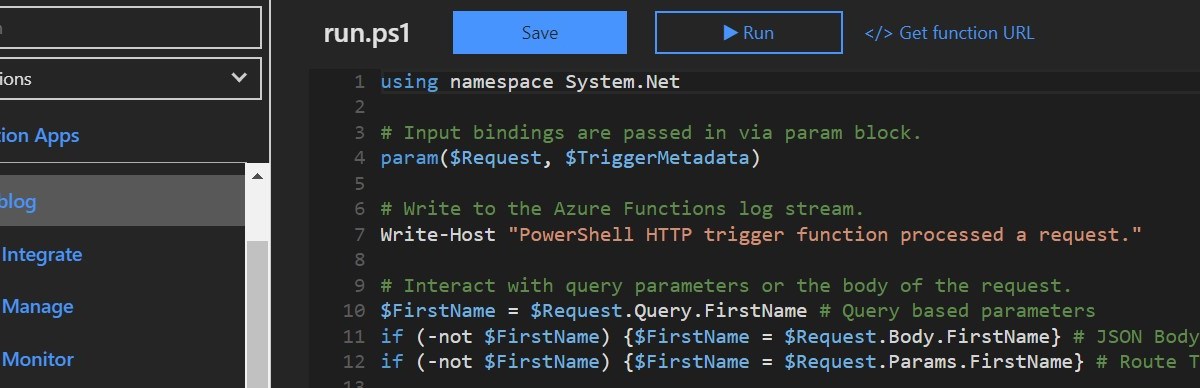
PowerShell based Azure Functions v2
I am writing this for all PowerShell people, it’s not easy for non-developers or IT Pros who can use PowerShell only to grasp things like HTTP methods for example. Running PowerShell based Azure Functions allows you to do any type of function based stuff you would normally do with a PowerShell function, feeding it parameter values and getting output. Plus it makes you feel like a developer, where you can sort of create your own APIs! Using parameters and feeding parameter values to PowerShell functions Vs using PowerShell Azure Functions works slightly different. There are 3 ways to send parameter…
Quick & Dirty way to run PowerShell as a scheduled task
The PowerShell execution policy is there to protect us but not to stop us from doing the ‘not so best practice‘ things. Best practice would be to sign all your scripts with a code signing certificate, and by using ISE Steroids this makes this process much much easier with the click of a button. However there are times you just want to run a PowerShell script ‘as is‘ with the guarantee it will run – bearing in mind the default behaviour of a computer is Remote Signed meaning a PowerShell script from any remote source needs to be signed with…
Upload PFX Cert to Azure Key Vault
When was the last time you tried to upload a certificate to the Azure Key Vault? At the time of writing, you can’t from the portal. Good news, you can using PowerShell. Below will guide you how to upload a private key certificate to Azure Key Vault: This file contains hidden or bidirectional Unicode text that may be interpreted or compiled differently than what appears below. To review, open the file in an editor that reveals hidden Unicode characters. Learn more about bidirectional Unicode characters Show hidden characters ### Log into Azure Add-AzureRmAccount $Subscription = (Get-AzureRmSubscription | Out-GridView –Title "Choose…
 Marc Kean
You must be logged in to post a comment.