
My recent video on Azure File Sync. Derived from the customer ready deck. FAQs: Do we have any GA dates? Can tell customers Azure File Sync GA will end of April, beginning of May Any restrictions on using/testing in Australia during preview. only 5TB Azure File Shares – 100TB Azure File Shares on the roadmap no cross region cloud endpoint sync until GA No backup to recovery vault for long term retention – this is on the roadmap currently Azure File Sync uses Azure Files snapshots, one snapshot daily to a maximum of 200 snapshots Azure Files snapshots allow for…
Need to Know Podcast – Episode 172
Automatically Start/Stop virtual machines, the Azure Reboot and more on this episode of the Need to Know podcast. Start/Stop VMs during off-hours solution in Azure Automation The Start/Stop VMs during off-hours solution starts and stops your Azure virtual machines on user-defined schedules, provides insights through Log Analytics, and sends optional emails by leveraging SendGrid. It supports both Azure Resource Manager and classic VMs for most scenarios. This solution provides a decentralised automation capability for customers who want to reduce their costs leveraging serverless, low cost resources. Features include: Schedule VMs to start/stop Schedule VMs to start/stop in ascending order using…
Need to Know Podcast – Episode 171
New Azure VMs ND, DCv2 and the M series are all GA’d, another free eBook for developers, new WhiteBoard app and the Azure Application Architecture Guide on episode 171 of the Need to Know podcast. ND and NCv2 virtual machines now available ND and NCv2 virtual machines (VMs), as announced at Build 2017, are now available. The ND-series, powered by NVIDIA Tesla P40 GPUs based on the new Pascal Architecture will provide more than twice the performance over the previous generation for FP32 (single precision floating point operations), for AI workloads utilising CNTK, TensorFlow, Caffe, and other frameworks. The ND-series also…
Need to Know Podcast – Episode 170
VMware on Azure, free Azure ebook, Azure Stack @ ANZ plus more on the latest Need to Know podcast. Host VMware infrastructure with VMware virtualization on Azure Most workloads can be migrated to Azure easily using services like Azure Site Recovery; however, there may be specific VMware workloads that are unique and more challenging to migrate to the cloud. For these workloads, you may need the option to run the VMware stack on Azure as an intermediate step. Microsoft have announced the preview of VMware virtualization on Azure, a bare-metal solution that runs the full VMware stack on Azure hardware, co-located…
Azure News 2017 – Week 47
This week on the Need to Know podcast, ND series of VMs for Deep Learning & NCv2 series for HPC compute coming into GA in December, brand new NCv3-series VMs that use NVIDIA Tesla V100 GPUs. System state backup directly to Azure using Azure Backup and much more. Azure App Service and Functions on Azure Stack We are pleased to share that Azure App Service and Functions are now generally available on Azure Stack. This release brings the power of Azure App Service and Azure Functions on-premises, and offers product support for customers running in multinode environments. Learn more in this…
Change Azure ARM VM OS disk
Sometimes you would want to create an Azure ARM based Virtual Machine using an existing VHD disk. It used to be much easier in ASM (Classic). However you can easily swap out the OS disk for a VM using PowerShell. This post focuses on swapping un-managed disks, however you can swap out managed disks now, since April 2018. Simply create a new (non-managed disk) based VM in Azure with new disks. Then you use PowerShell to swap out the OS disk with an existing disk. Good news is that the OS disk doesn’t have to be sysprepped, simply swap the…
Add additional NIC to Azure ARM VM
Sometimes you would want to add an additional Network Interface Card to a Microsoft Azure ARM (Azure Resource Manager) based virtual machine. PowerShell is your answer: This file contains hidden or bidirectional Unicode text that may be interpreted or compiled differently than what appears below. To review, open the file in an editor that reveals hidden Unicode characters. Learn more about bidirectional Unicode characters Show hidden characters # Recently tested fully with a later version of the Azure PowerShell module – Install-Module AzureRM -RequiredVersion 4.4.1 #region Logon to Azure Login-AzureRmAccount $subscription = Get-AzureRmSubscription | Out-GridView -PassThru Select-AzureRmSubscription -SubscriptionId $subscription.Id #endregion…
Azure News 2017 – Week 43
New Fv2 VMs (fastest in the public cloud), Cray Supercomputers and Azure Container Service (AKS) on the latest Need to Know podcast episode 168. Fv2 VMs are now available, the fastest VMs on Azure The new Fv2 VM family in Azure now generally available offers the Intel® Xeon® Scalable processor (code-named Skylake), the fastest Skylake CPU in the public cloud today. The closest cloud competitor offering Skylake currently only offers 2.0 GHz. These VM sizes are hyper-threaded and run on the Intel® Xeon® Platinum 8168 processor, featuring a base core frequency of 2.7 GHz and a maximum single-core turbo frequency of 3.7…
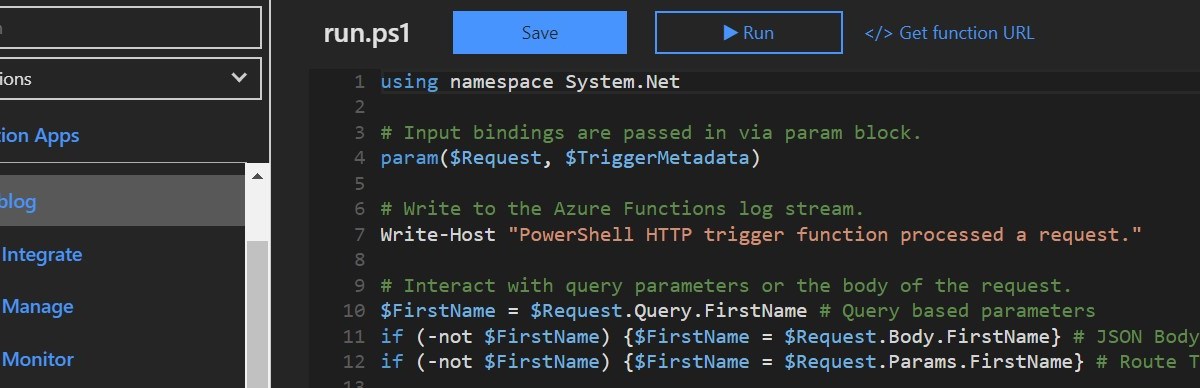
PowerShell based Azure Functions v2
I am writing this for all PowerShell people, it’s not easy for non-developers or IT Pros who can use PowerShell only to grasp things like HTTP methods for example. Running PowerShell based Azure Functions allows you to do any type of function based stuff you would normally do with a PowerShell function, feeding it parameter values and getting output. Plus it makes you feel like a developer, where you can sort of create your own APIs! Using parameters and feeding parameter values to PowerShell functions Vs using PowerShell Azure Functions works slightly different. There are 3 ways to send parameter…
Quick & Dirty way to run PowerShell as a scheduled task
The PowerShell execution policy is there to protect us but not to stop us from doing the ‘not so best practice‘ things. Best practice would be to sign all your scripts with a code signing certificate, and by using ISE Steroids this makes this process much much easier with the click of a button. However there are times you just want to run a PowerShell script ‘as is‘ with the guarantee it will run – bearing in mind the default behaviour of a computer is Remote Signed meaning a PowerShell script from any remote source needs to be signed with…
 Marc Kean
You must be logged in to post a comment.